/ Content
PHP developers don't usually think about memory leaks. And for good reason. In a traditional request lifecycle, PHP boots up, handles the request, and tears everything down. Memory gets freed, objects get destroyed, and the next request starts clean. It's the "share nothing" architecture, and it's one of PHP's genuine strengths.
Then you start running queue workers. Or a WebSocket server. Or a custom daemon. And suddenly, you're watching top and your PHP process is eating 800MB of RAM and climbing. Welcome to long-running PHP, where all the memory management habits you never had to build come back to bite you.
I spent a truly miserable week tracking down a memory leak in a queue worker last year. The worker processed about 2,000 jobs before it would get killed by the OOM killer, and because we were running multiple workers under Supervisor, they'd just restart and slowly leak again. It looked like everything was fine until it very much wasn't. Here's what I learned.
Why Long-Running Processes Leak
In a normal web request, it doesn't matter if you're a bit sloppy with memory. Allocate a huge array, forget to unset it, who cares? The process dies in 200ms anyway. But in a queue worker, that process might run for hours. Every job shares the same process memory, and anything that accumulates between jobs is a leak.
The most common culprits, in my experience:
Event listeners that stack up. If you register an event listener inside a job (or in code that runs per-job), you're adding a new listener on every iteration. The listener array grows forever. The listeners themselves hold references to objects, preventing garbage collection.
Laravel's query log. By default in some configurations, Laravel records every query that runs. In a web request, that's maybe 20 queries. In a worker that's been running for six hours, that's tens of thousands of query records sitting in an array.
Static properties and singletons. Anything stored in a static property or in a singleton bound in the container persists for the life of the process. If your code appends to a static array (caches, registries, lookup tables) that array never shrinks.
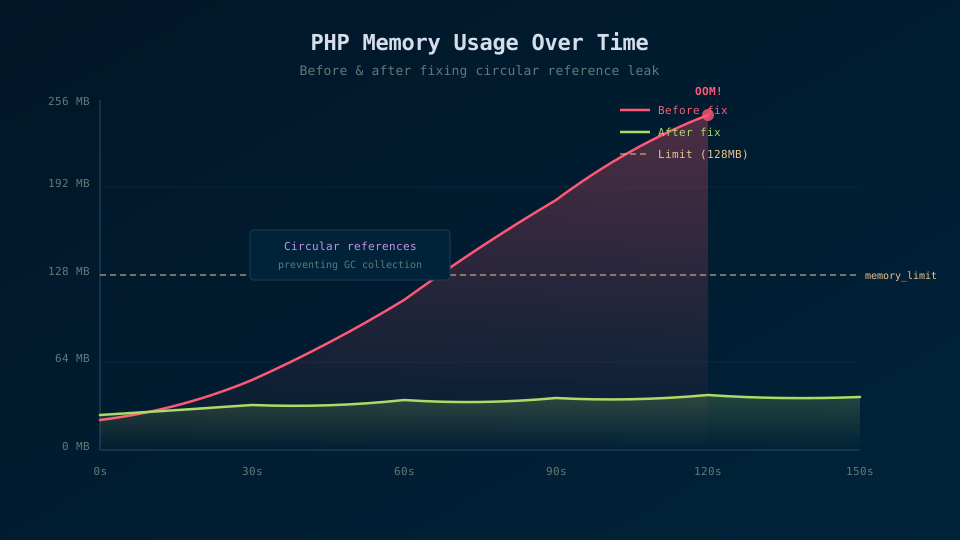
Circular references. PHP's garbage collector handles circular references, but not always promptly. If you're creating complex object graphs in a tight loop, the GC might not keep up, and memory usage spikes between collection cycles.
Starting the Investigation
The first thing I do when I suspect a leak is instrument the process with memory_get_usage(). It's crude but effective. I'll add logging at the start and end of each job to see if memory is trending upward:
class ProcessPodcast implements ShouldQueue
{
    use Queueable;

    public function handle(): void
    {
        $before = memory_get_usage(true);

        $this->doActualWork();

        $after = memory_get_usage(true);
        $diff = $after - $before;

        if ($diff > 0) {
            Log::warning("Memory grew by {$diff} bytes processing podcast {$this->podcast->id}");
        }
    }
}
If you see memory growing after every job and never dropping, you've got a leak. If it grows and then drops periodically, that's just the garbage collector doing its thing, probably not a real leak.
For a broader view, I'll log memory at the worker level. You can hook into Laravel's queue events to track this across all jobs without modifying individual job classes:
// In a service provider
Queue::before(function (JobProcessing $event) {
    Log::debug("Before job: " . number_format(memory_get_usage(true) / 1024 / 1024, 2) . " MB");
});

Queue::after(function (JobProcessed $event) {
    Log::debug("After job: " . number_format(memory_get_usage(true) / 1024 / 1024, 2) . " MB");
});
Plot those numbers over time and you'll get something like Figure 1, a sawtooth pattern where memory climbs during each job and partially drops after GC, but the baseline keeps creeping up. That rising baseline is your leak.
The Usual Suspects
Once you've confirmed there's a leak, it's time to find it. Here's my checklist, roughly in order of likelihood.
Check the query log first. This is the single most common leak I've seen in Laravel workers. Run DB::disableQueryLog() in your worker or check that DB_LOG_QUERIES is off. You can verify it's not the culprit by checking DB::getQueryLog(). If it's growing, that's your problem.
Look for event listener accumulation. If any package or your own code calls Event::listen() during job execution, those listeners stack up. Each one holds references to whatever closures or objects you passed. Search your codebase for Event::listen calls that happen outside of service provider boot() methods. Those are suspect.
Audit static properties. Grep for static $ across your codebase and vendor packages. Any static array that gets appended to without being cleared is a potential leak. I once found a third-party PDF library that cached font metrics in a static array. Perfectly reasonable for a web request, catastrophic for a daemon that generated thousands of PDFs.
Check for singletons holding state. If you've bound something as a singleton in the container and it accumulates data over time, it'll never be freed. Laravel's Octane documentation covers this well because Octane has the exact same problem. It's essentially a long-running process.
Reaching for Xdebug
When the simple approaches don't reveal the source, I'll bring in Xdebug's profiler. It's heavier, but it gives you actual allocation data. Enable it in your php.ini:
xdebug.mode=profile
xdebug.output_dir=/tmp/xdebug
xdebug.profiler_enable=1
Run your worker with profiling on, let it process a few hundred jobs, and then open the resulting cachegrind file in KCachegrind or QCachegrind. Sort by memory usage and you'll see exactly which functions are allocating the most. It's not subtle, the leaking function will stand out.
Fair warning: profiling slows things down significantly. Don't profile in production. Run a local worker with a subset of realistic jobs and profile that.
Fixing the Leaks
Most fixes are anticlimactic. Disable the query log. Move the event listener registration to a service provider. Clear the static array at the end of each job. The dramatic part is finding them, the fix is usually a one-liner.
For leaks you can't easily fix (maybe they're in a vendor package), Laravel gives you escape hatches. The --max-jobs and --max-time flags on queue:work tell the worker to exit after processing N jobs or after N seconds. Combined with Supervisor, the worker just restarts fresh. It's not elegant but it's practical. I've got a worker in production right now with --max-jobs=500 because a third-party package leaks about 50KB per job and I haven't had time to submit a PR. The worker restarts every 500 jobs, memory stays under control, and nobody's pager goes off.
You can also call gc_collect_cycles() manually at the end of each job to force the garbage collector to run. This helps with circular reference buildups. It adds a few milliseconds of overhead but can meaningfully reduce memory growth.
Prevention Going Forward
After that miserable debugging week, I added a few habits to my workflow. I always disable the query log in queue workers. I run workers with --max-jobs or --max-time as a safety net. I add a memory check middleware to our worker that logs a warning if post-job memory exceeds a threshold.
And honestly? I've stopped treating memory as something PHP handles for me. In long-running processes, you need to think about it the way you would in any other language. Allocate what you need, clean up after yourself, and don't trust that something magic is going to save you. Because in a queue worker, nothing will.