/ Content
I learned about multipart uploads the hard way. A client needed to accept video uploads, some over 2 GB, and the standard Storage::put() approach was timing out, eating memory, and generally making users miserable. The fix wasn't complicated once I understood the mechanics, but I wasted a solid afternoon figuring it out. Hopefully this post saves you that afternoon.
Why Regular Uploads Fail
When you use Storage::putFile() or Storage::put(), Laravel reads the entire file into memory (or streams it as a single request) and sends it to S3 in one shot. For a 50 MB file, that's fine. For a 500 MB file, you'll start hitting PHP's memory limit. For a 2 GB file, you're going to run into S3's own 5 GB single-PUT limit, various timeout issues, and the very real problem that if the upload fails at 99%, you start over from zero.
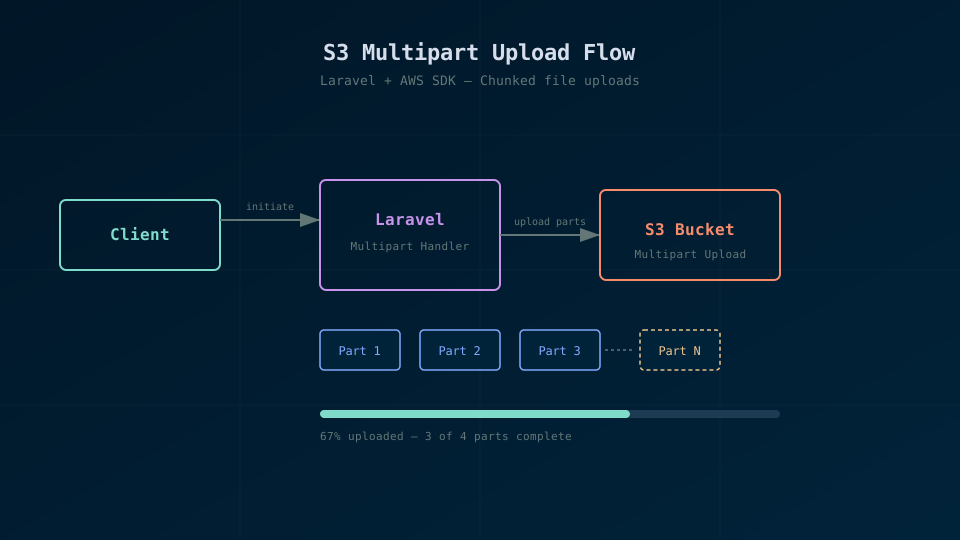
Multipart upload solves all of these. Instead of one giant request, you split the file into parts (typically 5-100 MB each), upload each part independently, and then tell S3 to assemble them. If a part fails, you retry just that part. The file never needs to live entirely in memory.
As shown in the diagram above (see Figure 1), the flow is: initiate the upload, send parts in parallel, then complete the upload with a manifest of all the parts.
Setting Up the AWS SDK
Laravel's Flysystem adapter handles simple uploads, but for multipart uploads you'll want the AWS SDK directly. It's already a dependency of league/flysystem-aws-s3-v3, so you don't need to install anything extra.
First, make sure your S3 config is set up in config/filesystems.php (it probably already is). Then you can grab an S3 client from the filesystem:
use Aws\S3\S3Client;
use Illuminate\Support\Facades\Storage;

$client = Storage::disk('s3')->getClient();
$bucket = config('filesystems.disks.s3.bucket');
The Multipart Upload Flow
Here's a service class that handles the whole process. I've stripped it down to the essentials:
class S3MultipartUploader
{
    private S3Client $client;

    private string $bucket;

    public function __construct()
    {
        $this->client = Storage::disk('s3')->getClient();
        $this->bucket = config('filesystems.disks.s3.bucket');
    }

    public function upload(string $localPath, string $s3Key, int $partSizeMb = 50): string
    {
        $partSize = $partSizeMb * 1024 * 1024;
        $fileSize = filesize($localPath);
        $handle = fopen($localPath, 'rb');

        // Step 1: Initiate
        $upload = $this->client->createMultipartUpload([
            'Bucket' => $this->bucket,
            'Key' => $s3Key,
        ]);

        $uploadId = $upload['UploadId'];
        $parts = [];
        $partNumber = 1;

        try {
            // Step 2: Upload parts
            while (! feof($handle)) {
                $body = fread($handle, $partSize);

                $result = $this->client->uploadPart([
                    'Bucket' => $this->bucket,
                    'Key' => $s3Key,
                    'UploadId' => $uploadId,
                    'PartNumber' => $partNumber,
                    'Body' => $body,
                ]);

                $parts[] = [
                    'PartNumber' => $partNumber,
                    'ETag' => $result['ETag'],
                ];

                $partNumber++;
            }

            fclose($handle);

            // Step 3: Complete
            $this->client->completeMultipartUpload([
                'Bucket' => $this->bucket,
                'Key' => $s3Key,
                'UploadId' => $uploadId,
                'MultipartUpload' => ['Parts' => $parts],
            ]);

            return $s3Key;
        } catch (Throwable $e) {
            fclose($handle);
            $this->client->abortMultipartUpload([
                'Bucket' => $this->bucket,
                'Key' => $s3Key,
                'UploadId' => $uploadId,
            ]);

            throw $e;
        }
    }
}
The important part: we read the file in chunks with fread, so we never hold more than one part (50 MB by default) in memory at a time. The try/catch ensures we abort the multipart upload if anything goes wrong. This matters because incomplete multipart uploads stick around in S3 and can rack up storage costs. I set a lifecycle rule on my buckets to auto-clean incomplete uploads after 7 days, just as a safety net.
Adding Progress Tracking
For a queued job processing large uploads, you probably want to track progress so the frontend can show a progress bar. I use a cache key per upload:
public function uploadWithProgress(string $localPath, string $s3Key, string $trackingKey): string
{
    $partSize = 50 * 1024 * 1024;
    $fileSize = filesize($localPath);
    $totalParts = (int) ceil($fileSize / $partSize);
    $completedParts = 0;

    // ... inside the while loop, after each successful uploadPart:
    $completedParts++;
    Cache::put($trackingKey, [
        'progress' => round(($completedParts / $totalParts) * 100),
        'completed_parts' => $completedParts,
        'total_parts' => $totalParts,
    ], now()->addHour());
}
Your frontend can poll an endpoint that reads from cache. It's not fancy, but it works great. I've tried WebSockets for this and it's overkill for most situations. A simple poll every 2-3 seconds gives a smooth enough experience.
Handling Failures and Retries
Network hiccups happen, especially with large uploads. You can wrap each part upload in a retry loop:
$result = retry(3, function () use ($s3Key, $uploadId, $partNumber, $body) {
    return $this->client->uploadPart([
        'Bucket' => $this->bucket,
        'Key' => $s3Key,
        'UploadId' => $uploadId,
        'PartNumber' => $partNumber,
        'Body' => $body,
    ]);
}, sleepMilliseconds: 1000);
Laravel's retry helper is perfect here. Three attempts with a 1-second delay between them handles most transient network errors. If all three attempts fail, the exception bubbles up and the upload gets aborted cleanly.
Running It as a Queued Job
You don't want a 2 GB upload blocking a web request. Wrap the whole thing in a job:
class ProcessLargeUpload implements ShouldQueue
{
    use Queueable;

    public int $timeout = 3600;

    public int $tries = 1;

    public function __construct(
        public string $localPath,
        public string $s3Key,
        public int $uploadId,
    ) {}

    public function handle(S3MultipartUploader $uploader): void
    {
        $uploader->uploadWithProgress(
            $this->localPath,
            $this->s3Key,
            "upload-progress:{$this->uploadId}"
        );

        // Clean up local temp file
        @unlink($this->localPath);
    }
}
Notice $timeout = 3600. You need to give it enough time, because the default 60-second timeout will kill large uploads. I set $tries = 1 because the uploader already handles per-part retries internally. Retrying the entire job would re-upload parts that already succeeded, which is wasteful.
A Few Things That Bit Me
Part sizes have constraints: minimum 5 MB (except the last part), maximum 5 GB, and a maximum of 10,000 parts per upload. For most files, 50 MB parts work great. For truly massive files (50 GB+), you'll want to bump that up to avoid hitting the 10,000 part limit.
Also, watch out for temporary file storage. If your users are uploading to your server first and then you're multipart-uploading to S3, you need enough disk space for the temp file. On an app server with 20 GB of storage, a few concurrent 5 GB uploads will fill your disk fast. Consider streaming directly from the client to S3 using presigned URLs for really large files, but that's a different blog post.
Multipart uploads aren't complicated once you understand the three-step flow: initiate, upload parts, complete. The AWS SDK handles the hard parts. Your job is just to chunk the file, track progress, and clean up on failure.